


The Essential Tool for Mac Power Users, Hackintosh Builders, and System Administrators
ESP Mounter is a powerful yet intuitive macOS application designed to simplify the process of mounting, managing, and accessing EFI (Extensible Firmware Interface) partitions on your Mac. Whether you’re building a Hackintosh, trying to install macOS on an unsupported Mac using OpenCore Legacy Patcher or troubleshooting boot issues, managing OpenCore or Clover bootloaders, or simply need quick access to your system’s EFI partition, ESP Mounter streamlines your workflow with an elegant, native macOS interface.
What are the differences between EFI and ESP:
| Aspect | EFI (UEFI) | ESP (EFI System Partition) |
|---|---|---|
| Type | Firmware specification / interface | Disk partition (storage area) |
| Purpose | Controls boot process & hardware init | Holds boot files that EFI loads |
| Location | In the motherboard’s flash memory | On your hard drive / SSD |
| Size | N/A (firmware) | Usually 100–512 MB |
| Format | N/A | FAT32 (with specific flags) |
| Required for | Modern booting (replaces BIOS) | UEFI-based booting (GPT disks) |
| Can exist without the other? | No (you need EFI to use ESP) | Technically yes, but useless without EFI |

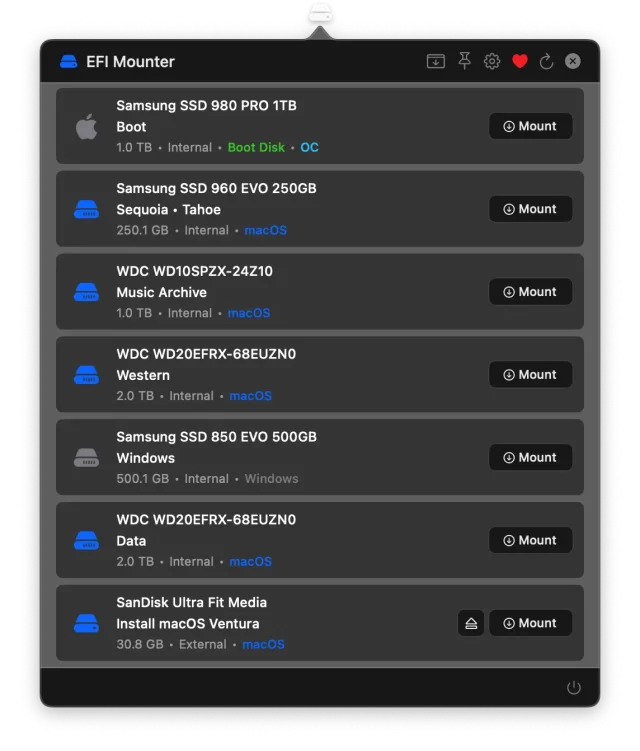
Instant EFI Access
Gone are the days of opening Terminal and typing complex diskutil commands. ESP Mounter provides one-click access to all EFI partitions on your system, whether they’re on internal drives, external storage, removable media, or even disk images. The app automatically detects all available EFI partitions and displays them in an easy-to-navigate interface.
Intelligent Bootloader Detection
ESP Mounter goes beyond basic partition management by intelligently detecting and identifying bootloader configurations:
OpenCore Detection: Automatically identifies OpenCore bootloader installations, displays version information, and helps you locate which disk contains your active OpenCore configuration
Clover Detection: Recognizes Clover bootloader setups with comprehensive file scanning and version tracking
Boot Disk Identification: Clearly marks your system’s boot disk with visual indicators, preventing accidental modifications to critical system files
Multi-Disk and Multi-EFI Support
Many advanced setups involve multiple EFI partitions across different disks. ESP Mounter handles these scenarios gracefully:
View and manage multiple EFI partitions per disk
Expand/collapse disk views to see all associated EFI partitions
Copy EFI folders between different disks with built-in safety checks
Automatic backup creation when overwriting existing EFI configurations
Comprehensive Filesystem Detection
ESP Mounter analyzes your disks and identifies operating systems and filesystem types:
macOS: Detects APFS, HFS+, and other Apple filesystems
Windows: Identifies NTFS and Windows system partitions
Linux: Recognizes ext4, xfs, btrfs, ZFS, and dozens of other Linux filesystems
ExFAT: Distinguishes between standalone ExFAT and Linux/Windows ExFAT configurations
This comprehensive detection helps you understand exactly what’s on each disk before making changes.
Key Features
Dual Interface Modes
Choose the interface that fits your workflow:
Menu Bar Mode: Lightweight and unobtrusive, ESP Mounter lives in your menu bar for instant access without cluttering your desktop
Window Mode: Full-featured traditional window interface with more screen real estate for managing multiple disks simultaneously
Switch between modes instantly without restarting the application.
Safe EFI Operations
Your data’s safety is paramount:
Administrator Authentication: Secure password storage in macOS Keychain
Visual Warnings: Clear indicators for boot disks and bootloader disks
Automatic Backups: Option to backup existing EFI folders before overwriting
Mount Status Indicators: Always know which EFI partitions are currently mounted
EFI Folder Cloning
Need to duplicate your EFI configuration to another disk? ESP Mounter makes it effortless:
Mount the source EFI partition
Click the copy button
Select the destination disk
Choose to backup or overwrite existing EFI folder
Automatic verification ensures successful copy
Perfect for:
Testing new OpenCore configurations
Creating backup boot drives
Setting up multiple Hackintosh systems
Migrating bootloader configurations
Smart Disk Management
ESP Mounter intelligently handles various disk types:
Internal Disks: Full support for SATA, NVMe, and other internal storage
External Disks: USB drives, Thunderbolt storage, and external SSDs
Removable Media: SD cards, USB flash drives, and other removable storage
Disk Images: Mount and manage EFI partitions within DMG and ISO files
Filter which disk types to display based on your workflow needs.
Real-Time Disk Monitoring
The app automatically detects when disks are connected or disconnected, updating the interface in real-time. No manual refresh needed – your disk list is always current.
Finder Integration
Double-click any EFI partition to mount it and automatically open in Finder (configurable). When mounted, quickly access EFI partitions with the built-in “Open in Finder” button.
Advanced Features
System Information Display
Get detailed information about your Mac:
Model name and year
Processor specifications
Graphics card details
Memory configuration
Serial number (with privacy toggle)
Boot disk and startup volume
Bootloader version and location
Automatic Updates
Stay current with the latest features and improvements:
Built-in update checker using Sparkle framework
Configurable automatic update checking (daily, weekly, monthly)
Optional automatic installation of updates
Manual update checking on demand
Extensive Customization
Tailor ESP Mounter to your preferences:
Toggle disk type visibility (internal, external, removable, disk images)
Enable/disable automatic Finder opening on mount
Configure notification preferences
Launch at login option
Choose menu bar or window mode as default
Perfect For
Hackintosh Enthusiasts
Building or maintaining a Hackintosh? ESP Mounter is indispensable:
Quickly access OpenCore or Clover EFI folders
Test different configurations safely
Copy working EFI setups to new hardware
Identify which disk contains your bootloader
System Administrators
Manage multiple Macs with ease:
Rapid EFI access without Terminal commands
Standardize bootloader configurations across machines
Troubleshoot boot issues efficiently
Document system configurations with detailed hardware info
Dual/Triple Boot Users
Running multiple operating systems? ESP Mounter simplifies the complexity:
See all operating systems detected on each disk
Manage EFI partitions for macOS, Windows, and Linux
Safely maintain separate boot configurations
Prevent accidental modifications to the wrong EFI
Mac Power Users
Even if you’re not running Hackintosh, ESP Mounter is useful for:
Firmware updates and modifications
Boot troubleshooting
Understanding your Mac’s storage configuration
System maintenance and diagnostics
Security and Privacy
Your security is our priority:
Admin password encrypted in macOS Keychain
No data collection or telemetry
Open operation logs for transparency
Password can be removed at any time
All operations require explicit user confirmation
System Requirements
macOS: Big Sur (11.0) or later
Architecture: Universal app supporting both Intel and Apple Silicon Macs
Permissions: Administrator access required for mount/unmount operations
Why Choose ESP Mounter?
Native macOS Experience
Built entirely in Swift and SwiftUI, ESP Mounter feels right at home on your Mac:
Native macOS design language
Dark mode support
Smooth animations and transitions
Keyboard shortcuts
Native notifications
Regular Updates
We’re committed to keeping ESP Mounter current with the latest macOS versions and features. Regular updates ensure compatibility and add user-requested features.
Active Development
ESP Mounter is actively maintained with frequent updates addressing:
New macOS version compatibility
User feature requests
Performance improvements
Bug fixes and refinements
Community-Driven
We listen to our users. Many of ESP Mounter’s features came directly from community feedback and feature requests.
Get Started Today
Stop struggling with Terminal commands and complex disk management. ESP Mounter brings professional-grade EFI partition management to an elegant, easy-to-use macOS application.
Whether you’re setting up your first Hackintosh, managing a fleet of Macs, or simply need occasional access to EFI partitions, ESP Mounter is the tool you need.
Support Development
ESP Mounter is developed and maintained by MacMeUp. If you find the app useful, please consider supporting its continued development through a donation. Your support helps us add new features, maintain compatibility with the latest macOS versions, and provide ongoing updates.
Ready to simplify your EFI management workflow?
Download ESP Mounter today and experience the easiest way to manage EFI partitions on macOS.
Compatible with macOS Big Sur through macOS Tahoe and beyond.